
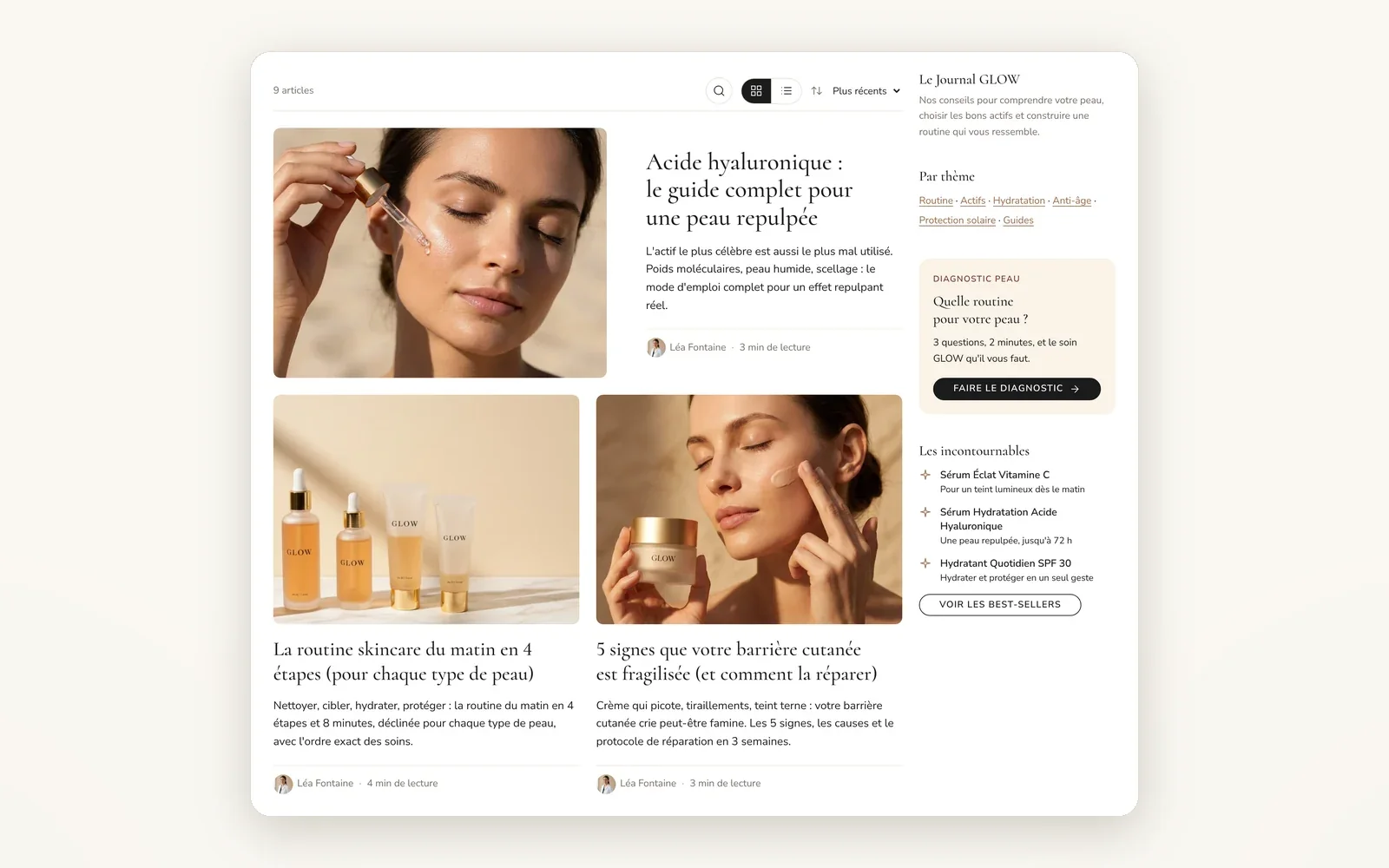
A sidebar or drawer for your blog
Add a column next to the articles, fixed or as a drawer, and fill it with theme blocks: text, image, button, form...
What it does
- 3 modes: off, sidebar or drawer, on the left or right
- The sidebar can stay visible while scrolling
- The blog search can sit at the top of the sidebar
What you can set
- Display
- Side
- Sticky sidebar on scroll
- Drawer button position
- Open button text
- Search placement
Where to find it
Theme editor›Blogs›Blog posts section›Sidebar / drawer, then add blocks to the section
"Le Journal GLOW" blog: the right-hand column next to the posts (journal intro, Par thème, Diagnostic peau box, "Les incontournables" and "Voir les best-sellers"). It stays visible as you scroll. On a phone, the "Explorer le journal" button opens it as a drawer.
Related features
Your store deserves better than an empty theme.
Try Speedfly for 14 days on your real store. Not convinced? Cancel in one click.