
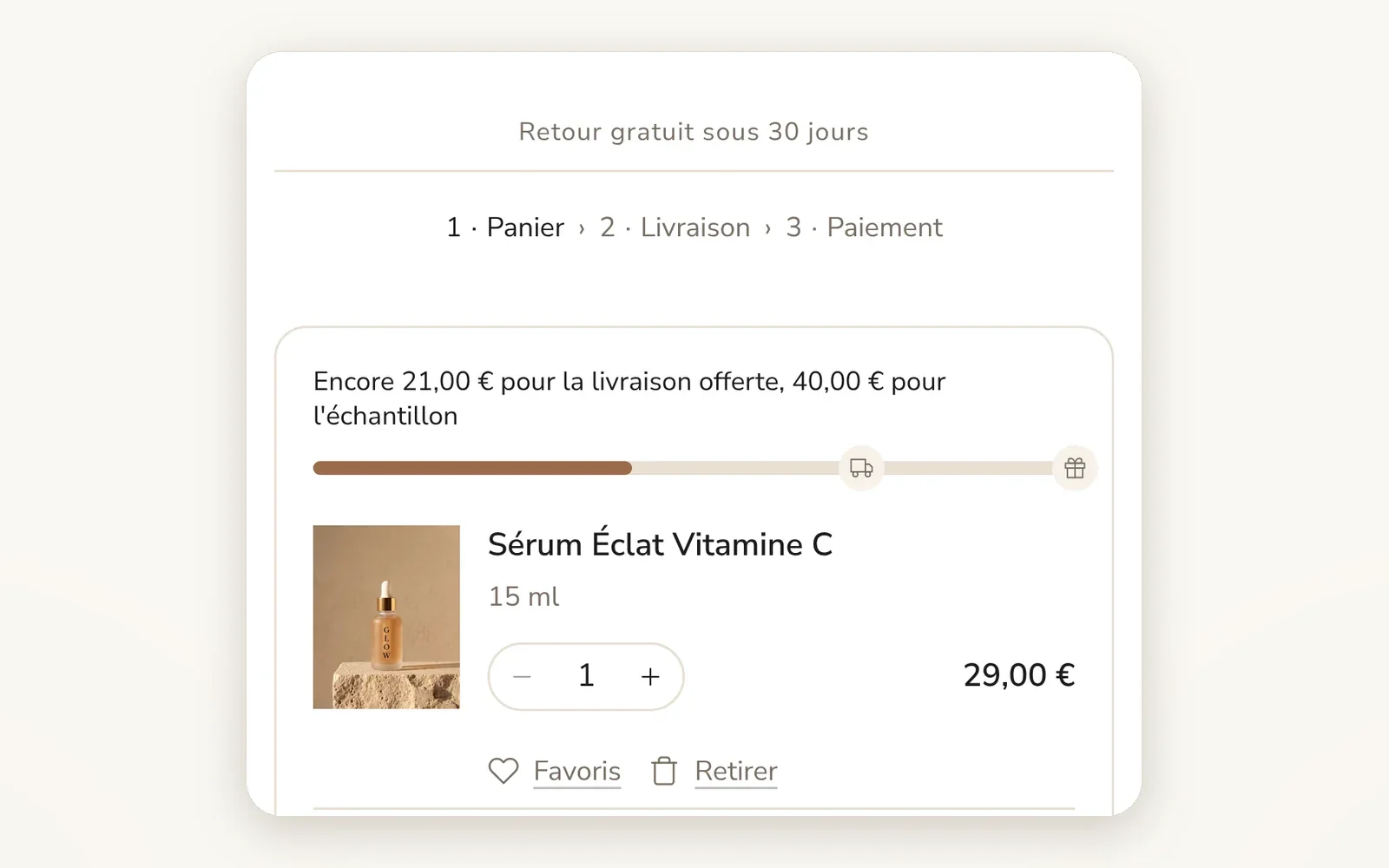
Checkout steps shown in the cart
A "Cart › Shipping › Payment" marker at the top of the cart: the shopper sees only a few steps are left before ordering.
What it does
- Up to 4 steps with the text of your choice (empty = step hidden)
- Step numbers and separator of your choice (›, →, ·, |, /)
- Colors for the current step and the next steps
What you can set
- Show checkout steps indicator
- Step 1 label
- Step 2 label
- Show step numbers
- Separator between steps
- Current step color
Where to find it
Theme editor›Cart drawer section›Checkout steps (and Cart page section)
Cart page (after adding a product): under "Retour gratuit sous 30 jours", the "1 · Panier › 2 · Livraison › 3 · Paiement" indicator, above the item.
Related features
Your store deserves better than an empty theme.
Try Speedfly for 14 days on your real store. Not convinced? Cancel in one click.